SpotCalc.com
Product landing page and PWA install hub for a precious-metal buying calculator — from weigh-in to finished invoice in under ten seconds.

ABOUT THE SITE
A mobile-first marketing page that doubles as the app’s front door.
SpotCalc.com is a single-page product site built to explain, promote, and install a PWA precious-metal buying calculator. The headline says it all: One list for everything. Fully customizable.
The page leads with live Au/Ag/Pt spot prices above the fold — proving the product is real and pulling data before a visitor even scrolls. From there, four feature sections walk through the core workflows: list mode, custom purity settings, invoicing, and the My Value margin tool.
Visitors on a phone can install the PWA directly from the site with a single “Add to Home Screen” step. Desktop visitors get the full feature overview and can open the app in their browser without installing anything.
The design is intentionally lean — one strong headline, a live price row, and feature sections that explain the product and close the install without friction.
PROJECT TYPE
KEY FEATURES
- check_circleLive metal price ticker (Au/Ag/Pt)
- check_circleiOS and Android PWA install flow
- check_circleOffline-capability messaging
- check_circleResponsive mobile-first layout
- check_circleApp screenshot showcase with feature callouts
- check_circleZero-dependency static page
LIVE SITE
spotcalc.comopen_in_newThe marketing site
SpotCalc.com works for dealers wherever they are — on a desktop before opening the shop or on a phone at a customer’s kitchen table.
Desktop hero — headline, live spot prices, and install CTAs above the fold

Mobile view — same content, tuned for phone-first install

Full page — headline, live prices, feature sections, and step-by-step PWA install instructions
The app it installs
The site’s job is to get dealers to install the PWA. These are the four screens they’ll use every time they buy.
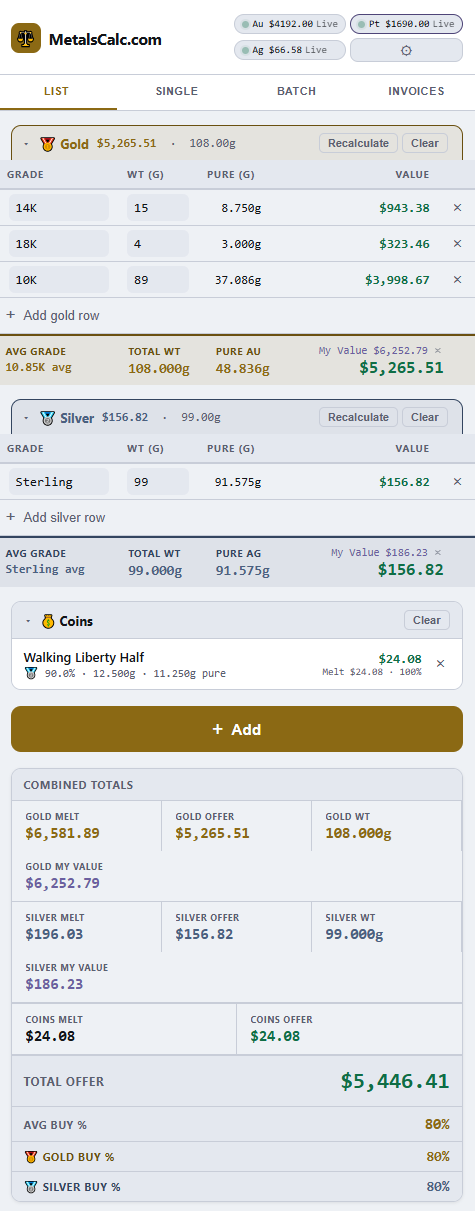
List Mode
Gold, silver, platinum, and coins — grouped with a live running total.
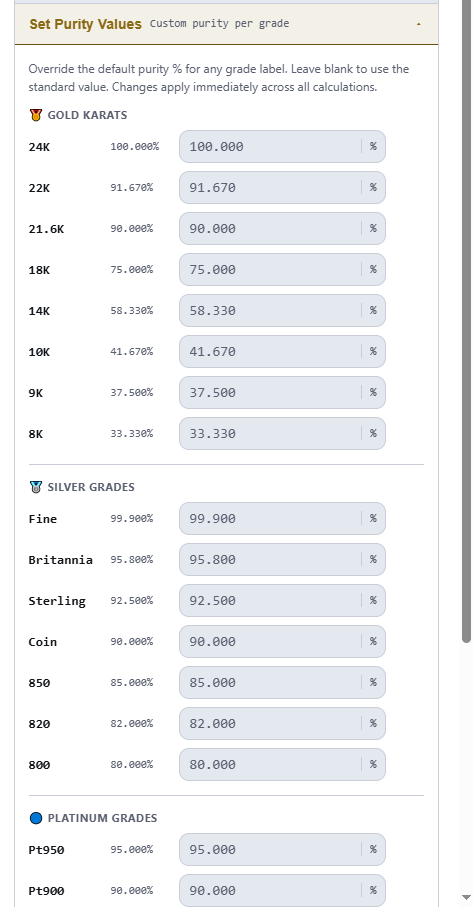
Purity Settings
Override % per grade for gold, silver, and platinum. Applies instantly.
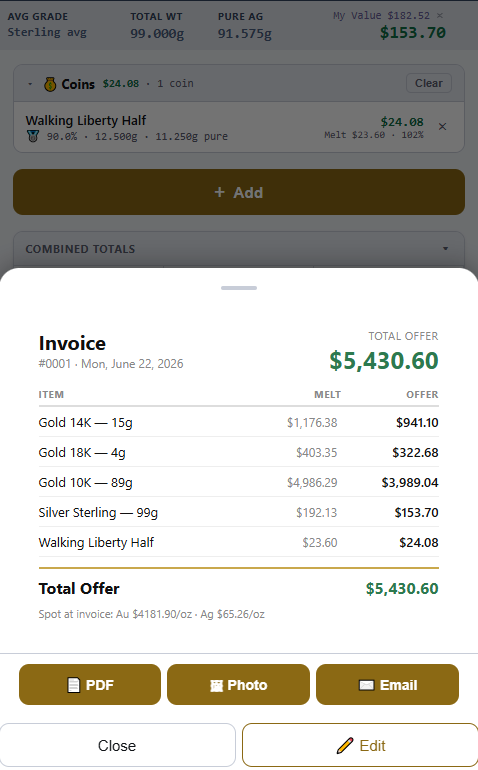
Invoice Preview
Itemized melt values and offers. Export as PDF, photo, or email in one tap.
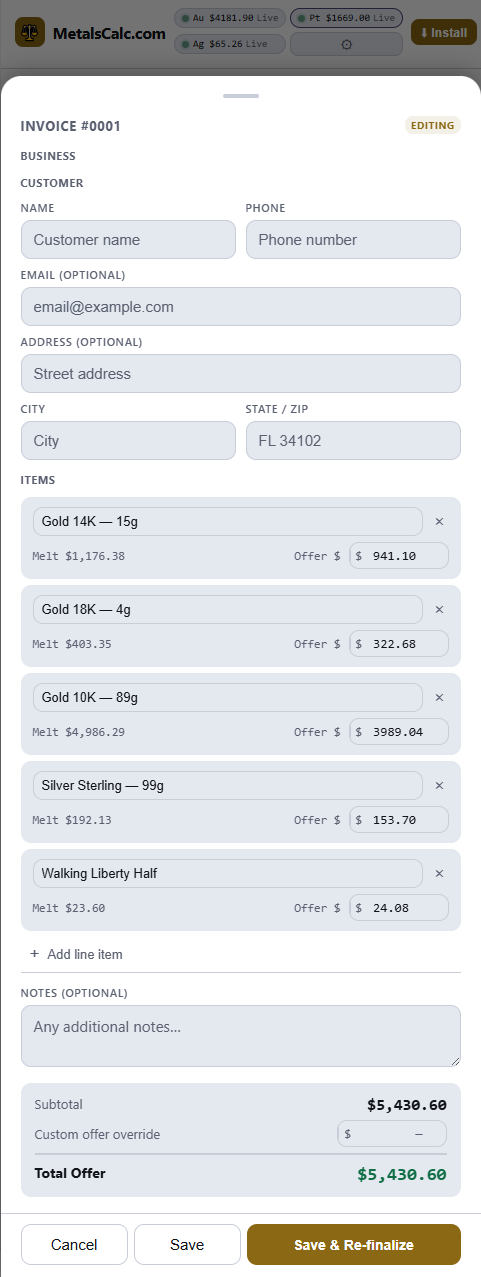
Invoice Editor
Customer details and per-item offer adjustments before finalizing.
WHAT THE SITE COVERS
Built to convert a curious visitor into an installed app.
LIVE SPOT PRICES EMBEDDED
The page fetches and displays real-time Au/Ag/Pt prices on load — proving the product works before visitors even open the app.
PWA INSTALL FLOW
Step-by-step instructions for adding to Home Screen on iOS and Android, reducing the friction between landing and installing.
OFFLINE-FIRST MESSAGING
The site prominently calls out 100% offline capability — a key differentiator for buyers working in basements, storage units, or remote locations.
10-SECOND OFFER PROMISE
The <10s weigh-in-to-offer metric is front and center, setting a concrete performance expectation that builds trust before the install.
MY VALUE MARGIN TOOL
The site explains how dealers can set a resell target per metal and see melt value, their sell target, and offer amount side by side — know your spread before you quote.
INVOICE CAPABILITY CALLED OUT
One-tap PDF, photo, or email invoice export is highlighted as a key feature — showing the product closes the deal paperwork, not just the calculation.
Project Investment
What would a build like this cost?
Estimated build time
~15–20 hours
Priced against our current published website pricing, this marketing site maps to a Landing Page — a lean single-page product site — plus the live spot-price integration that proves the product above the fold. Here is roughly how the build time breaks down, in hours at our published $125/hr shop rate:
Landing page base
Single-page product site with feature sections, app screenshot showcase, and install CTAs.
Live Au/Ag/Pt spot-price ticker
Real-time metal prices fetched and displayed on load — custom data integration.
The SpotCalc app itself
The offline-first PWA calculator this site installs was built as separate custom software, before Surette Data Systems narrowed to one-time website builds — not a current offering.
Closest package
Landing Page
One-time landing page builds begin at $650 for 1–3 simple pages with a 7-day post-launch bug-fix period. Custom data features like this one’s live spot-price integration are quoted as add-ons.
Estimate only — build-time in hours at our published $125/hr shop rate, reconciled against our current starting prices. Final pricing depends on pages, content readiness, design requirements, integrations, and third-party tools; hours × rate is not a quote, and every project is scoped and quoted individually.
Ready to install SpotCalc?
Open the app directly in your browser or add it to your phone’s home screen for the full offline experience.